iOSUA - Myanmar Teams မွ iOS ႏွင့္ပတ္သက္ေသာ သတင္းမ်ား Apps မ်ား နည္းပညာအခ်က္အလက္မ်ားကိုမွ်ေဝေပးသြားမွာပါ
Showing posts with label App. Show all posts

Tuesday, April 25, 2017

Free App Of The Day(File Manager Pro)

File Manager Pro($4.99 to Free)
iPhone & iPad အတြက္ File Manager လိုတယ္လို႕ေျပာေျပာေနတဲ႕ Users ေတြအတြက္အၾကိဳက္ေပါ႕ :)
ေတာ္ေတာ္ေလးအသံုးဝင္ပါတယ္ Free ရတုန္းေလးဆြဲထားဖို႕ေတာ႕လိုပါတယ္ Size ကလည္း ေသးပါတယ္ခင္ဗ် သူရဲ႕အသံုးဝင္ပံုကိုေအာက္က Video File ထည္းမွာဝင္ၾကည္႕နိုင္ပါတယ္


Read More

Sunday, April 9, 2017

Critical Ops(Online FPS Game)

Zawgyi 
             မဂၤလာပါ။ကၽြန္ေတာ္ iOS အတြက္ Graphics ေကာင္းၿပီးကစားလို႔အင္မတန္ေကာင္းတဲ့ Online FPS Game ေလးတခုနဲ႔မိတ္ဆက္ခ်င္ပါတယ္။တခ်ိဳ႕ေတြက CS:GO လိုမ်ိဳး Online FPS Game ကစားခ်င္ေပမယ့္ 15$ ေပးကစားရမွာႏွေမ်ာလို႔ပဲျဖစ္ျဖစ္၊အိမ္က PC ကမႏိုင္လို႔ပဲျဖစ္ျဖစ္မကစားရတဲ့သူေတြရွိမွာပါ။အဲ့ေတာ့သူမ်ားေတြကစားတဲ့ Replay ေလာက္ပဲၾကည့္ရၿပီးသေရယိုေနရတာေပါ့(ကၽြန္ေတာ္အပါအဝင္😛)။အဲ့ေတာ့ကၽြန္ေတာ္တို႔လိုသူမ်ိဳးေတြအတြက္ CS:GO ကိုမမွီေပမယ့္ CS:GO နီးပါးကစားလို႔ေကာင္းတဲ့ Mobile Online FPS Game ေလးတခုနဲ႔မိတ္ဆက္ေပးပါရေစ။ Gameနာမည္ကေတာ့ Critical Ops ျဖစ္ပါတယ္။ Graphics ပိုင္းဟာလည္း Mobiel Game အေနနဲ႔ဆိုေတာ္ေတာ္ေကာင္းပါတယ္။မိမိစိတ္ၾကဳိက္ Graphics ကိုျပင္ႏိုင္ပါတယ္(Lowest ကေန Ultra အထိ)။ Weapon မ်ားကိုလည္း Skin မ်ားဝယ္ၿပီးစိတ္ႀကိဳက္အလွဆင္ႏိုင္ပါတယ္။ File Size ကလည္း 250mb ပဲရွိပါတယ္။Game ကေတာ့ Free To Play ပါ ဒါေပမယ့္ In-App-Purchase ပါပါတယ္။ Download Link ေအာက္ေတြေရးေပးထားပါတယ္။

Download Link >> https://appsto.re/us/IhsQ8.i 

 Hein Min Htun
 (iOS Users Association-Myanmar)iOSUA🇲🇲 

Unicode 
             မင်္ဂလာပါ။ကျွန်တော် iOS အတွက် Graphics ကောင်းပြီးကစားလို့အင်မတန်ကောင်းတဲ့ Online FPS Game လေးတခုနဲ့မိတ်ဆက်ချင်ပါတယ်။တချို့တွေက CS:GO လိုမျိုး Online FPS Game ကစားချင်ပေမယ့် 15$ ပေးကစားရမှာနှမျောလို့ပဲဖြစ်ဖြစ်၊အိမ်က PC ကမနိုင်လို့ပဲဖြစ်ဖြစ်မကစားရတဲ့သူတွေရှိမှာပါ။အဲ့တော့သူများတွေကစားတဲ့ Replay လောက်ပဲကြည့်ရပြီးသရေယိုနေရတာပေါ့(ကျွန်တော်အပါအဝင်😛)။အဲ့တော့ကျွန်တော်တို့လိုသူမျိုးတွေအတွက် CS:GO ကိုမမှီပေမယ့် CS:GO နီးပါးကစားလို့ကောင်းတဲ့ Mobile Online FPS Game လေးတခုနဲ့မိတ်ဆက်ပေးပါရစေ။ Gameနာမည်ကတော့ Critical Ops ဖြစ်ပါတယ်။ Graphics ပိုင်းဟာလည်း Mobiel Game အနေနဲ့ဆိုတော်တော်ကောင်းပါတယ်။မိမိစိတ်ကြိုက် Graphics ကိုပြင်နိုင်ပါတယ်(Lowest ကနေ Ultra အထိ)။ Weapon များကိုလည်း Skin များဝယ်ပြီးစိတ်ကြိုက်အလှဆင်နိုင်ပါတယ်။ File Size ကလည်း 250mb ပဲရှိပါတယ်။  Game ကတော့ Free To Play ပါ ဒါပေမယ့် In-App-Purchase ပါပါတယ်။Download Link အောက်တွေရေးပေးထားပါတယ်။


 Hein Min Htun 
(iOS Users Association-Myanmar)iOSUA🇲🇲


Read More

Wednesday, April 5, 2017

Youtube Downloader,Facebook Downloader,MP3 Converter


Facebook မွာတင္ထားတဲ႕Video,facebook Comment box မွာတင္ထားတဲ႕ Videoေတြ
(ကိုကိုေတြအၾကိဳက္ေပါ႕ ;) ) နဲ႕Youtube က Video ေတြကိုအလြယ္တကူ Download ဆြဲလို႕ရတဲ႕အျပင္ကိုဆြဲခ်င္တဲ႕ Video Quality ေတြကိုပါေရြးျပီး download ဆြဲလို႕ရပါတယ္ အဲ႕ဒါေတြအျပင္ ဆြဲထားတဲ႕ Video ေတြကို mp3 file အျဖစ္ Convert ေတြပါလုပ္နိုင္ပါတယ္ 
ေတာ္ေတာ္ေလးကိုအသံုးဝင္တယ္ဟုတ္ အဲ႕လိုအသံုးဝင္တဲ႕ App ေတြကေတာ႕ App Store မွာမရွိသေလာက္ပါပဲ ဒီ App ကလည္း app store ကမဟုတ္ေပမဲ႕ App Store မွာရွိတဲ႕ Video downloader ေတြထက္ပိုျပီးေတာ႕ေတာင္အသံုးဝင္ပါတယ္ ကဲညြန္းမေနေတာ႕ဘူး Download Link ေပးမယ္ 
App install နည္း Video Download ဆြဲနည္းေတြကိုေအာက္မွာရွယ္လင္းေပးမယ္ ;p 

App ကို အရင္ဆံုး Download ဆြဲပါ Download Here


How to Install မွာေရးထားတဲ႕ Process အတုိင္း App ကို Download ပါ ဆြဲျပီးရင္ Menu>General>Profiles & Devices Management မွာ ddid co.,ltd. ကို Trust လုပ္လိုက္ပါ အဲ႕ဒါဆိုရင္ Doda-HD ဆိုတဲ႕ App ကိုစသံုးလို႕ရပါျပီ 

Download video from Facebook

ကဲစဆြဲလို႕ရပါျပီ အရင္ဆံုး Facebook က Video File ကို Download ဆြဲၾကည္႕ရေအာင္
ကိုဆြဲခ်င္တဲ႕ Video ကိုရွာပါရွာလို႕ေတြ႕ရင္

Share ကိုနိွပ္ျပီးေတာ႕Copy Link ကိုနိွပ္ပါ ျပီးရင္ 


App ကိုဖြင္႕ျပီးေတာ႕ Home Tab ရဲ႕ ထိပ္မွာ Paste လုပ္လိုက္ပါ အဲ႕ဒါဆိုရင္ခုဏက ကိုဆြဲခ်င္တဲ႕Video file ေလးေပၚလာပါလိမ္႕မယ္ 


 ေပၚလာရင္Video ကို Play လိုက္ပါျပီးရင္ ညာဘက္ထိပ္နားက ဝိုင္ထားနဲ႕ဟာေလးကိုနိွပ္


ကို Download ဆြဲခ်င္တဲ႕ Video quality ကိုဆြဲလိုက္လို႕ရပါျပီ Download ဆြဲလိုက္တာနဲ႕ Download Queue ထည္းမွာဆြဲေနမွာျဖစ္ျပီး ဆြဲျပီးတာနဲ႕ Downloader video မွာ video file ေရာက္ေနပါလိမ္႕မယ္ ေအာက္က share ကိုနိွပ္ျပီးေတာ႕ camera roll ထည္းကို export လုပ္လို႕ရပါတယ္
camera roll ထည္းမထည္႕ထားပဲ app ထည္းမွာပဲၾကည္႕ခ်င္တယ္ဆိုရင္ online လိုပါလိမ္႕မယ္ အဲ႕ဒါေၾကာင္႕မလို႕ camera roll ထည္းသိမ္းထားေစခ်င္ပါတယ္(camera roll ထည္း export လုပ္နည္းအပိုင္းကို ေအာက္ဆံုးမွာေဖာ္ျပေပးပါမည္)
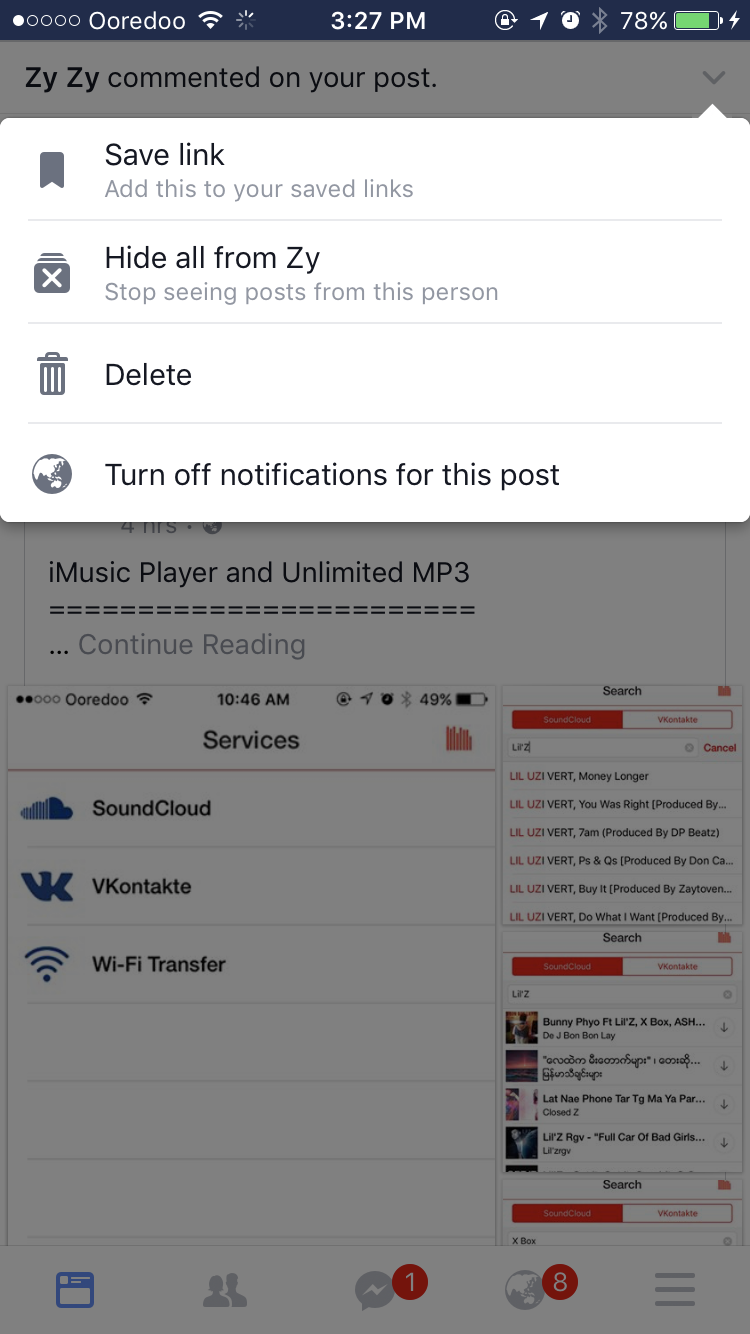
comment ထည္းက video ေတြကိုဆြဲခ်င္ရင္လည္းဒီတိုင္းပါပဲ Post ကို Copy Link လုပ္ပါ လုပ္လို႕မရရင္ Post ရဲ႕ ညာဘက္ေထာင္႕ကျမွားေလးကိုနိွပ္ျပီး Save Post လုပ္ျပီး ေတာ႕ကို႕ facebook acc ရဲ႕ Save tap မွာ Copy link လုပ္ျပီးေတာ႕ ဒီနည္းအတိုင္း paste လုပ္ျပီးရင္ Comment box က video ကို play Download ေလးကိုနိွပ္ျပီး Download ဆြဲလို႕ရပါေသးတယ္
Save post မလုပ္တတ္ရင္ေအာက္မွာတစ္ပံုခ်င္းစီျပထားပါတယ္

Save Post
Tap Save Tab
Copy Link

ကဲ Facebook ကဇာတ္ကားေတြ Comment box က video ေတြ Download ဆြဲလို႕ရသြားျပီဟုတ္ :)

Download Video From Youtube

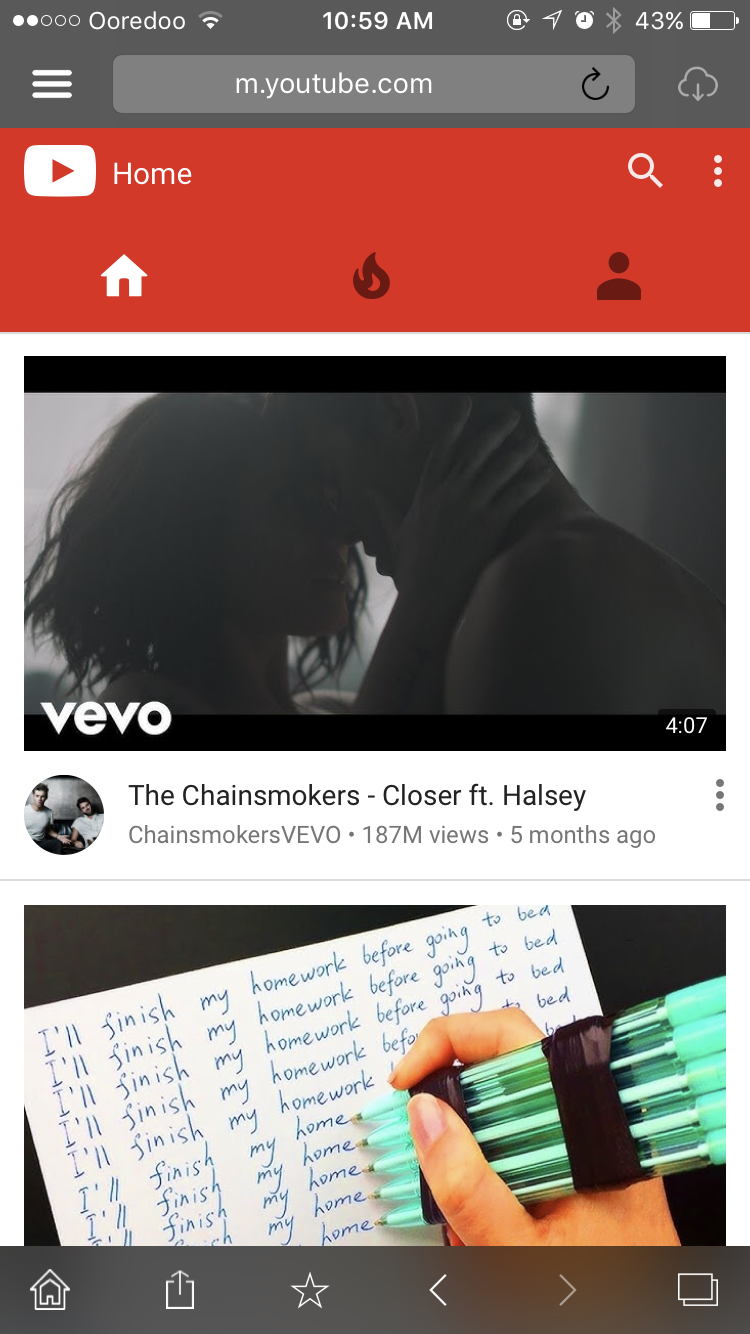
Application ရဲ႕ Home Page ကိုဖြင္႕ပါျပီးရင္ Google ထည္းကိုဝင္ျပီးေတာ႕ YouTube လို႕ရိုက္ထည္႕ပါ

Youtube ထည္းေရာက္သြားရင္ကိုဆြဲခ်င္တဲ႕ သီခ်င္းနာမည္ကို Youtube Search Box ကေနရိုက္ရွာပါ


က်ေနာ္ၾကိဳက္တဲ႕ We Don't Talk Anymore Downlaod ဆြဲၾကည္႕ရေအာင္ :p video ရွာေတြ႕ျပီဆိုရင္ play နိွပ္ျပီေတာ႕ ညာဘက္ထိပ္နားက download ေလးကိုနိွပ္လိုက္ပါ

ၾကိဳက္တဲ႕ Video Quality ကို Download ဆြဲနိုင္ပါျပီ 


Download ဆြဲေနတဲ႕ Video file ကို Download Queue Tab ထည္းမွာေတြ႕ရပါလိမ္႕မယ္

ဆြဲလို႕ျပီးသြားမွသာ Downloaded Video Tab ထည္းေရာက္သြားမွာပါ

ကိုဆြဲထားတဲ႕ Music Video ကို mp3 convert ခ်င္ရင္ ဝိုင္းထားတဲ႕ဟာေလးကိုနိွပ္ျပီးေတာ႕ Convert လုပ္နိုင္ပါတယ္ အဲ႕ဒါဆိုရင္ Convert Queue Tab ထည္းမွာ Convert လုပ္ေနျပီးေတာ႕ျပီးသြားတဲ႕အခါ


Converted mp3 tab ထည္းေရာက္သြားပါလိမ္႕မယ္ mp3 ေတြကိုေတာ႕ iCloud Drive ထည္း Share လို႕ရပါတယ္ 

Camera Roll ထည္းပို႕ခ်င္ရင္ေတာ႕ အလယ္က share ကိုနိွပ္ျပီးေတာ႕Save Video ေလးကိုေရြးလိုက္တာနဲ႕ camera roll ထည္းက Video Album ထည္းကိုေရာက္ေနပါလိ္မ္႕မယ္မေရာက္ေသးရင္ save video ကိုပဲထပ္နိွပ္ပါ :) အေပၚမွာေျပာခဲ႕တဲ႕အတိုင္း camera roll ထည္းကို export လုပ္ထားေစခ်င္ပါတယ္ အားလံုးအဆင္ေျပၾကပါေစ :)
Read More

Geekbench 4

ဒီ App ကေတာ႕ April 10 ရက္ေန႕အထိ Free ေပးမွာျဖစ္ပါတယ္ iOS Users တိုင္းရွိသင္႕တဲ႕(မရွိမျဖစ္) App စာရင္းေတြထည္းမွာလည္းပါပါတယ္ ဒီ App ကိုသံုးျပီးေတာ႕ကို႕ Device ရဲ႕Model,OS,Processor,Motherboard အေၾကာင္းေတြကိုသိနိုင္သလိုCPU,GPU ပိုင္းေတြရဲ႕ ျမန္နွဳန္း လုပ္ေဆာင္နိုင္စြမ္းေတြကိုလည္းတိုင္းတာလို႕ရပါတယ္ တိုင္းတာျပီးထြက္လာတဲ႕ Result မ်ားကိုလည္းအေသးစိတ္ေဖာ္ျပေပးနိုင္ပါတယ္ ဒါအျပင္ကို႕ Devices နဲ႕ တျခား Devices ရဲ႕ CPU ျမန္နွဳန္းေတြကိုလည္း ဒီ App ကိုသံုးျပီးေတာ႕ နိွုင္းယွဥ္လို႕ရပါတယ္


Read More

Sunday, April 2, 2017

Thunderspace

မိုးေတြသည္းၾကီးမဲၾကီး ရြာတဲ႕ညေတြဆို အိပ္လို႕ေကာင္းတယ္ဟုတ္ ဒါေပမဲ႕အဲ႕လိုညေတြကရဖို႕ခဲရင္းလာပါျပီ (ခုမုန္တိုင္းက်ေနေတာ႕သိပ္မခဲရင္းဘူးေပါ႕ ကဲ ဒီ app ေလးကေတာ႕ ညတိုင္းမိုးေတြရြာ မိုးေတြျခိမ္းေစမဲ႕ feeling ေလးကိုရေစမဲ႕ app ေလးပါဒီ app ေလးကိုဖြင္႕ နားၾကပ္ေလးတပ္ျပီးေတာ႕မိုးေတြရြာေနတဲ႕ညေလးကို ဖန္တီးပလိုက္ပါ 


Read More

Friday, March 31, 2017

Dynasty Warriors: Unleashed

ဒီ ဂိမ္းကို အခုေခတ္ကေလးေတြသိခ်င္မွသိလိမ္႕မယ္ ဒါေပမဲ႕က်ေနာ္တို႕ 90 Born ေတြကေတာ႕ရည္လည္သိမွ ေသခ်ာတယ္ :p
က်ေနာ္တို႕ ေက်ာင္းသားဘဝတုန္းက ဂိမ္းဆိုင္မွာသြားေဆာ႕ဖူးတဲ႕ ဂိမ္းတစ္ခုပါ :)
ဂိမ္းအေၾကာင္းကိုေဆာ႕မေျပာေတာ႕ပါဘူး
အေပၚကပံုေလးကိုၾကည္႕လိုက္တာနဲ႕မွတ္မိမွာပါ ဒါကဘာဂိမ္းလဲ ငါတို႕ငယ္ငယ္တုန္းကဘယ္လိုေဆာ႕ခဲ႕တာလဲဆိုတာကို ;) Size ကေတာ႕ေတာ္ေတာ္ၾကီးပါတယ္ Wifi နဲ႕ဆြဲမွအဆင္ေျပမွာပါ


Read More

Thursday, March 30, 2017

Lake Coloring Books: Art therapy to reduce stress

ပန္ခ်ီဆြဲဝါသနာရွင္ေတြအတြက္ သင္႕ေတာ္ျပီး app store မွာ Editor Choice ရထားတဲ႕ App ေလးတစ္ခုပါ

Description

Color yourself happy! De-stress with a vibrant collection of coloring books from Instagram artists, offered exclusively on Lake. There is plenty of FREE content to start with: daily drawings plus a free illustration with every coloring book. Coloring books come with 12 beautiful drawings that you can color over and over, plus a custom color palette. Lake is designed for adults, but is also a lot of fun for kids!

Release your inner happy while supporting artists. Browse through profiles to get to know them and their work. Choose from a wide variety of illustrations that sparks your creativity, including calming mandalas, cute florals, quirky beings, whimsical patterns, beautiful European cities, friendly animals, and more.

FEATURES
- One free illustration a day
- 5 piece tool set: acrylic brush, watercolor brush, spray, fill, and an eraser
- Harmonious colors: gradient color wheel with 245 hues
- Tap-to-fill coloring option
- History palette shows previously used colors
- Color inside the lines
- Zoom in/out
- Manageable number of coloring surfaces
- New coloring books added continuously
- Works offline
- Apple Pencil and 3D Touch support
- Instantly save your drawings
- Quick sharing and print options

FEATURED ARTISTS
Look for lovely creations by: Maja Säfström (@majasbok), Nina Stajner (@ninastajner), Katrin Wiehle (@katrinwiehle), Carlos Perez (@light_pencil), Laura Uy (@artandsoulcreativeco), Victoria Johnson (@victoriajohnsondesign), Skaiste Kodyte (@opopulis), Laura Blythman (@laurablythman), Nelleke Verhoeff (@redcheeksfactory), Elizabeth Olwen (@elizabetholwen), Walid Rusdianto (@mbeembee).

Can't find your favorite illustrator? Let us know: info@lakecoloring.com

SUBSCRIPTION INFO
By subscribing to Lake Premium you get unlimited access to all featured artists, coloring books and custom color palettes. By subscribing you also support the artists on a regular basis.

Good to know:
- you can subscribe to a yearly plan ($39.99 billed once a year), a monthly plan ($7.99 billed once a month) or a weekly plan that comes with a free 7 day trial ($2.99 billed once a week after the free trial expires). Pricing may vary in countries other than the U.S.
- the payment will be charged to your iTunes Account when you confirm the purchase.
- the subscription automatically renews for the same price and duration period as the original one weekly/monthly/yearly plan unless auto-renew is turned off at least 24-hours before the end of the current period.
-weekly free trial automatically converts to a paid weekly subscription (at $2,99) unless auto-renew is turned off at least 24-hours before the end of the trial period. From that point onwards, subscription automatically renews unless auto-renew is turned off at least 24-hours before the end of the current period.
- you can cancel the subscription or the free trial anytime via the subscription setting through your iTunes account. Do it at least 24 hours before the end of the free trial or subscription period to avoid being charged. Learn more: http://support.apple.com/kb/ht4098
- you may turn off the auto-renewal of your subscription via your iTunes Account Settings. You are not able to cancel the current subscription during its active period.
- any unused portion of a free trial period will be forfeited when the user purchases a Lake Premium subscription.
- cancel your free trial or subscription trial by going to your device settings and tap iTunes & App Store > Apple ID > View Apple ID > enter the password > Subscriptions > Assembly > Cancel Subscription button at the bottom.

Terms of Service: http://lakecoloring.com/termsofservice/
Privacy Policy: http://lakecoloring.com/privacypolicy/


Have something to tell us? Go ahead, we are happy to hear from you!
Email: info@lakecoloring.com
Instagram: @lakecoloring
Twitter: @lakecoloring or
Find us on facebook.com/lakecoloring

Enjoying Lake?
Write a review! We read them all and listen carefully. Thank you LOADS for your input! <3

Read More